
RAID, NAS & Server Data Recovery
RAID server or NAS down? Our Swiss laboratory recovers your data. Free diagnosis within 3 hours.
How to recover data from your RAID server or NAS?
RAID, NAS and SAN data recovery involves extracting files from a network storage system that has become inaccessible, degraded or corrupted. This intervention requires deep expertise in RAID architectures and network file systems.
NAS servers (Synology, QNAP, Buffalo) and SANs use RAID configurations (0, 1, 5, 6, 10) to distribute and protect data across multiple drives. When one or more drives fail, the RAID controller malfunctions, or software corruption occurs (VMware, Hyper-V, file system), the data becomes inaccessible. Our engineers manually reconstruct the drive order, RAID parity and volume metadata to extract every file.
Since 2006, SOS Data Recovery has processed over 11,300 media for more than 8,000 clients, individuals and businesses alike. Our laboratory in Ins, Switzerland, has the specialized tools for all RAID configurations, multi-bay NAS units and virtualized environments (VMware ESXi, Hyper-V).
The diagnosis is free and delivered within 3 hours of receipt, and 80% of the cost is only billed if your data is actually recovered. SOS Data Recovery is CyberSafe certified and rated 4.8/5 on Avis Vérifiés (296 reviews).
NAS (Network Attached Storage)
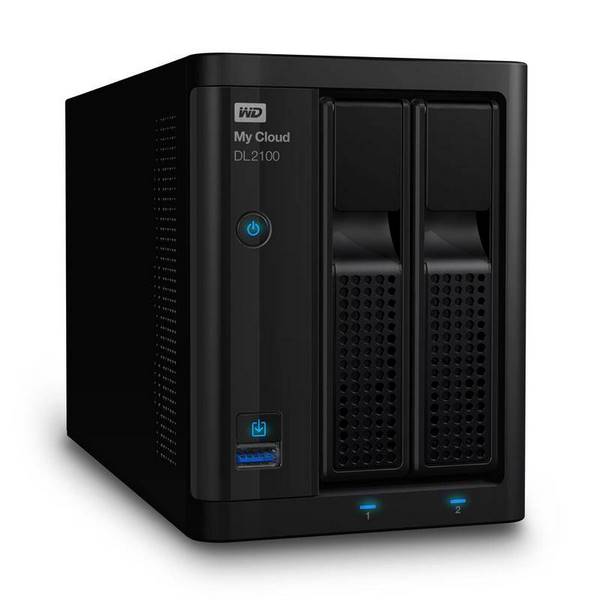
A NAS is a standalone file server connected to the network, centralizing storage across multiple disks in RAID or JBOD. When the volume becomes inaccessible (disk failure, file system corruption or handling error), our engineers manually rebuild the RAID configuration to extract every file.
SAN (Storage Area Network)
Unlike a NAS, a SAN provides low-level access to disks (iSCSI, Fibre Channel, SAS). Each server sees the SAN array as its own local disk, which adds complexity to recovery. Our specialists master these architectures and work on virtualized environments (VMware ESXi, Hyper-V) hosted on SAN.
RAID types we recover
Each RAID level uses a different strategy to distribute and protect data. Our engineers master every one of these architectures to rebuild your damaged volumes.
Understanding how RAID worksRAID 0
StripingData striped across multiple disks without redundancy. High performance, but the loss of a single disk means total data loss.
More informationRAID 1
MirroringData mirrored across two disks. Maximum redundancy, but storage capacity is halved.
More informationRAID 5
Distributed ParityDistributed parity across multiple disks. Good balance between performance, capacity and single-disk fault tolerance.
More informationRAID 6
Double ParityDouble parity enabling recovery from simultaneous failure of two disks. Enhanced protection for critical data.
More informationRAID 01
Mirror + StripeCombination of mirroring and striping. Improved performance with data replication across multiple disks.
More informationRAID 10
Stripe + MirrorStripe of mirrors (RAID 1+0). High redundancy and high performance, ideal for production servers.
More informationJBOD
No RAIDDisks used independently, without redundancy or grouping. Each disk is a standalone volume.
More informationRAID + Spare
Hot SpareRAID configuration with a dedicated hot spare disk. Automatic rebuild when a primary disk fails.
More informationDrobo RAID
ProprietaryProprietary Drobo technology combining multiple RAID levels with dynamic storage space management.
Sun RAID-Z
ZFSRAID implementation specific to the ZFS file system (Sun/Oracle). Distributed parity with built-in error detection and correction.
X-RAID
NetGearNetGear technology enabling hot RAID expansion without service interruption, using disks of different sizes.
Supported manufacturers
Hardware failure, software crash, human error or ransomware: our experts work on most RAID and NAS equipment on the market.
What are the most common server failures?
Is your NAS or RAID server down? Contact us for a free diagnosis.
RAID disk failure
One or more disks in the RAID array have failed. The volume is degraded or completely inaccessible. Do not attempt to rebuild the RAID without professional expertise.
RAID controller failure
The hardware RAID controller (Dell PERC, HP SmartArray, etc.) has failed. The system no longer boots or volumes are no longer recognized. Replacing it without precaution can destroy the data.
Failed rebuild
The automatic RAID rebuild failed due to a second disk failure during the process. This critical situation requires immediate specialized intervention.
File system corruption
The RAID volume is accessible but data is corrupted or unreadable. Often caused by a power outage, software crash, or NAS firmware issue.
Power outage
A sudden power outage can simultaneously damage multiple RAID disks and corrupt volume metadata. A faulty UPS often worsens the situation.
Human error or deletion
Accidental volume deletion, mishandling during disk replacement, or erroneous RAID reconfiguration. These errors can make all data inaccessible.
How does data recovery work?
From free diagnosis to secure delivery: a transparent 4-step process, entirely performed in our Swiss laboratory.
Free diagnosis within 3 hours
Send your media by secure post, drop it at one of our 30 collection points across Switzerland, or bring it directly to our laboratory in Ins. Our team performs a full analysis within 3 hours of receipt, free and with no commitment.
Transparent quote before any work
You receive a detailed quote outlining the type of failure, recovery chances and exact cost. You approve before any work begins. Full payment on success; only attempt costs are charged if recovery fails.
Recovery under ISO 5 laminar flow
Our technicians work under ISO 5 certified laminar flow with specialised tools (PC-3000). Your data never leaves our CyberSafe-certified and CyberSafe partner Swiss laboratory. Duration: 2 to 10 business days depending on complexity.
Secure delivery of your data
Your recovered data is delivered on a new encrypted drive, or via secure download according to your preference. Original media can be destroyed on request to guarantee confidentiality.
Has your model already been recovered?
Thousands of NAS and server models referenced in our database. Check if we have already handled equipment identical to yours.
Frequently asked questions
Our specialists answer the most common questions.
JBOD: One or more disks are defective
JBOD (Just a Bunch Of Disks) is an aggregate of multiple hard drives operating in sequential writing. Unlike RAID 0, data is written entirely to the first hard drive in the aggregate. Once it is full, writing continues on the second disk, and so on until the last disk in the array.
Consequence in case of failure: If a defective disk contains data, it is inaccessible until the disk is repaired or replaced. Unlike RAID 1 or RAID 5, JBOD offers no redundancy: the loss of a disk results in the loss of all the data it hosts.
Do not write any more data to the remaining disks and do not attempt to rebuild the JBOD yourself, as this could permanently overwrite recoverable data.
RAID 0: One or More Disks Failed — What to Do?
RAID 0 is a storage configuration that distributes data in blocks across multiple hard drives simultaneously (a technique called striping). Each file is fragmented into several pieces distributed across all the disks in the array. In the absence of redundancy, the failure of a single disk renders 100% of the data inaccessible, as the missing fragments make each file incomplete and unreadable. According to industry statistics, the risk of total data loss in RAID 0 is proportional to the number of disks: a 4-disk RAID 0 quadruples the risk of failure compared to a single disk.
When faced with a RAID 0 failure, do not attempt any manual reconstruction: any incorrect operation can irreparably worsen the data loss. Immediately contact a certified data recovery specialist, who will proceed in three steps:
- Diagnosis and repair of defective disks — restoring the physical or logical state of each damaged disk in a controlled environment (cleanroom if necessary).
- Sector-level cloning — creating identical images of each disk in order to work on copies and preserve the originals.
- RAID array reconstruction — reconstituting the stripe order, chunk size, and disk sequencing from the still-functional disks and the repaired disks.
RAID 1: One or more disks are faulty — what to do?
RAID 1 is a mirrored storage configuration in which each piece of data is written simultaneously to two or more disks, providing complete redundancy. If one disk fails, the data remains accessible on the intact mirror disk(s).
Even with RAID 1, a regular external backup (3-2-1 rule: 3 copies, 2 different media, 1 offsite) remains essential to protect against simultaneous failures or disasters.
RAID 5: A hard drive is defective
RAID 5 is a redundant storage configuration that distributes data and parity across a minimum of 3 hard drives, allowing for the failure of a single drive without data loss. If one of your drives is defective, your RAID 5 remains functional but switches to degraded mode: all data remains accessible, but any additional failure would result in total data loss.
Replace the defective drive as soon as possible by following these steps:
- Identify the failing drive – Consult your RAID controller interface or system logs to confirm which drive is the cause.
- Replace the drive hot or cold – If your controller supports hot-swap, replace the drive without shutting down the server; otherwise, shut down the equipment before the intervention.
- Start the rebuild – The RAID controller will automatically integrate the new drive and recreate the parity data. This operation can take several hours to more than a day depending on the capacity of the drives (allow approximately 1 to 2 hours per terabyte).
- Monitor the progress – During the rebuild, the RAID remains in degraded mode and performance may be reduced. Avoid any intensive load on the system during this phase.
Key point: During the rebuild, your system remains vulnerable: a second drive failure would result in total data loss. Make sure you have an up-to-date backup before and during the operation.
RAID 5: At least 2 hard drives are defective - what to do?
RAID 5 is a redundant storage configuration that tolerates the failure of only one disk at a time. When at least two disks fail simultaneously, the integrity of the array is compromised and the RAID is no longer functional: the data is no longer accessible by normal means.
Faced with the failure of two or more disks in a RAID 5, immediately call a data recovery specialist. Any uncontrolled reconstruction attempt risks aggravating the damage and making recovery impossible.
The specialist will proceed in two key stages:
- Diagnosis and repair of the defective disk(s) — analysis of mechanical or logical failures on each damaged disk, with intervention in a clean room if necessary.
- Data reconstruction — using the still functional disks and parity blocks to reconstruct all lost data.
Do not: do not turn off or restart the server, do not initiate automatic reconstruction from the RAID controller, and do not replace any disks without expert advice — these actions can permanently overwrite recoverable data.
RAID 6: At least 3 hard drives are defective — what to do?
RAID 6 is a redundant storage configuration that tolerates a maximum of 2 simultaneous disk failures thanks to its double parity. When at least 3 disks are defective at the same time, this tolerance is exceeded: the RAID 6 volume is no longer functional and the data is no longer accessible by the usual means.
- RAID 6 fault tolerance: 2 defective disks maximum
- Your situation: ≥ 3 defective disks — critical threshold exceeded
- Immediate consequence: automatic reconstruction impossible, risk of total data loss
Immediately call a data recovery specialist.
Do not attempt to rebuild the RAID yourself or replace the disks without professional assistance — any incorrect operation can make recovery definitively impossible.
RAID 6: One or two hard drives are defective
RAID 6 is a RAID level that uses dual parity, allowing a set of at least 4 hard drives to continue functioning even if one or two drives fail simultaneously. In this case, your RAID enters degraded mode: the data remains accessible and intact, but the tolerance for additional failures is reduced or non-existent until the failed drives are replaced.
Replace the defective drives as quickly as possible to avoid any risk of data loss. Your RAID controller will automatically integrate the new drives and launch a data reconstruction by parity procedure, an operation that can take several hours depending on the capacity of the drives (allow an average of 1 to 2 hours per terabyte). During this reconstruction phase, avoid any intensive use of the RAID, as an additional failure would lead to irreversible data loss.
RAID controller failure
A failed RAID controller is a hardware failure that prevents the operating system from detecting and accessing the entire RAID volume, making all data inaccessible until the failed component is replaced or bypassed by a specialist. According to Ontrack's data recovery statistics (2024), controller failures account for approximately 20% of cases of loss of access to RAID systems.
Any attempt to replace the RAID controller followed by a manual recreation of the RAID with incorrect parameters (disk order, block size, RAID level) will, in most cases, result in definitive data overwriting, with no possibility of recovery. Before any intervention, do not change any parameters and do not reset the controller. Entrust your disks to a certified RAID data recovery specialist, who has the necessary tools to reconstruct the original configuration in a secure environment.
RAID in Degraded Mode: Causes, Risks, and Solutions
RAID degraded mode is a critical state in which a RAID controller reports that one or more disks in the group are no longer functioning correctly, reducing data redundancy without necessarily interrupting service. According to Backblaze statistics (2024), 5.1% of hard drives fail each year, making degraded mode one of the most frequent RAID alerts in a server environment.
The system generally remains operational in degraded mode, but any additional disk failure can lead to total data loss. Rapid intervention is imperative.
Never replace two disks simultaneously on a RAID 5, at the risk of losing all data. If in doubt, consult a specialist before any intervention.
RAID is no longer detected by the computer
A RAID not detected by the computer is a critical situation that occurs when the RAID controller is defective or its configuration has been lost, making the entire RAID volume inaccessible to the operating system.
The main causes of an undetected RAID include:
- Defective RAID controller: The card or chip managing the RAID no longer responds, preventing any communication with the disks
- RAID configuration loss: The metadata describing the RAID structure (type, disk order, block size) has been erased or corrupted
- Power or connection problem: A faulty cable or unstable power supply can make the RAID invisible at startup
Attempting to manually recreate a RAID by re-entering its parameters is a very high-risk operation. A single incorrect value, RAID type, disk order, block size or offset, can lead to a total and irreversible loss of data.
JBOD (Just a Bunch Of Disks) is an aggregate of multiple hard drives operating in sequential writing. Unlike RAID 0, data is written entirely to the first hard drive in the aggregate. Once it is full, writing continues on the second disk, and so on until the last disk in the array.
Consequence in case of failure: If a defective disk contains data, it is inaccessible until the disk is repaired or replaced. Unlike RAID 1 or RAID 5, JBOD offers no redundancy: the loss of a disk results in the loss of all the data it hosts.
Do not write any more data to the remaining disks and do not attempt to rebuild the JBOD yourself, as this could permanently overwrite recoverable data.
RAID 0 is a storage configuration that distributes data in blocks across multiple hard drives simultaneously (a technique called striping). Each file is fragmented into several pieces distributed across all the disks in the array. In the absence of redundancy, the failure of a single disk renders 100% of the data inaccessible, as the missing fragments make each file incomplete and unreadable. According to industry statistics, the risk of total data loss in RAID 0 is proportional to the number of disks: a 4-disk RAID 0 quadruples the risk of failure compared to a single disk.
When faced with a RAID 0 failure, do not attempt any manual reconstruction: any incorrect operation can irreparably worsen the data loss. Immediately contact a certified data recovery specialist, who will proceed in three steps:
- Diagnosis and repair of defective disks — restoring the physical or logical state of each damaged disk in a controlled environment (cleanroom if necessary).
- Sector-level cloning — creating identical images of each disk in order to work on copies and preserve the originals.
- RAID array reconstruction — reconstituting the stripe order, chunk size, and disk sequencing from the still-functional disks and the repaired disks.
RAID 1 is a mirrored storage configuration in which each piece of data is written simultaneously to two or more disks, providing complete redundancy. If one disk fails, the data remains accessible on the intact mirror disk(s).
Even with RAID 1, a regular external backup (3-2-1 rule: 3 copies, 2 different media, 1 offsite) remains essential to protect against simultaneous failures or disasters.
RAID 5 is a redundant storage configuration that distributes data and parity across a minimum of 3 hard drives, allowing for the failure of a single drive without data loss. If one of your drives is defective, your RAID 5 remains functional but switches to degraded mode: all data remains accessible, but any additional failure would result in total data loss.
Replace the defective drive as soon as possible by following these steps:
- Identify the failing drive – Consult your RAID controller interface or system logs to confirm which drive is the cause.
- Replace the drive hot or cold – If your controller supports hot-swap, replace the drive without shutting down the server; otherwise, shut down the equipment before the intervention.
- Start the rebuild – The RAID controller will automatically integrate the new drive and recreate the parity data. This operation can take several hours to more than a day depending on the capacity of the drives (allow approximately 1 to 2 hours per terabyte).
- Monitor the progress – During the rebuild, the RAID remains in degraded mode and performance may be reduced. Avoid any intensive load on the system during this phase.
Key point: During the rebuild, your system remains vulnerable: a second drive failure would result in total data loss. Make sure you have an up-to-date backup before and during the operation.
RAID 5 is a redundant storage configuration that tolerates the failure of only one disk at a time. When at least two disks fail simultaneously, the integrity of the array is compromised and the RAID is no longer functional: the data is no longer accessible by normal means.
Faced with the failure of two or more disks in a RAID 5, immediately call a data recovery specialist. Any uncontrolled reconstruction attempt risks aggravating the damage and making recovery impossible.
The specialist will proceed in two key stages:
- Diagnosis and repair of the defective disk(s) — analysis of mechanical or logical failures on each damaged disk, with intervention in a clean room if necessary.
- Data reconstruction — using the still functional disks and parity blocks to reconstruct all lost data.
Do not: do not turn off or restart the server, do not initiate automatic reconstruction from the RAID controller, and do not replace any disks without expert advice — these actions can permanently overwrite recoverable data.
RAID 6 is a redundant storage configuration that tolerates a maximum of 2 simultaneous disk failures thanks to its double parity. When at least 3 disks are defective at the same time, this tolerance is exceeded: the RAID 6 volume is no longer functional and the data is no longer accessible by the usual means.
- RAID 6 fault tolerance: 2 defective disks maximum
- Your situation: ≥ 3 defective disks — critical threshold exceeded
- Immediate consequence: automatic reconstruction impossible, risk of total data loss
Immediately call a data recovery specialist.
Do not attempt to rebuild the RAID yourself or replace the disks without professional assistance — any incorrect operation can make recovery definitively impossible.
RAID 6 is a RAID level that uses dual parity, allowing a set of at least 4 hard drives to continue functioning even if one or two drives fail simultaneously. In this case, your RAID enters degraded mode: the data remains accessible and intact, but the tolerance for additional failures is reduced or non-existent until the failed drives are replaced.
Replace the defective drives as quickly as possible to avoid any risk of data loss. Your RAID controller will automatically integrate the new drives and launch a data reconstruction by parity procedure, an operation that can take several hours depending on the capacity of the drives (allow an average of 1 to 2 hours per terabyte). During this reconstruction phase, avoid any intensive use of the RAID, as an additional failure would lead to irreversible data loss.
A failed RAID controller is a hardware failure that prevents the operating system from detecting and accessing the entire RAID volume, making all data inaccessible until the failed component is replaced or bypassed by a specialist. According to Ontrack's data recovery statistics (2024), controller failures account for approximately 20% of cases of loss of access to RAID systems.
Any attempt to replace the RAID controller followed by a manual recreation of the RAID with incorrect parameters (disk order, block size, RAID level) will, in most cases, result in definitive data overwriting, with no possibility of recovery. Before any intervention, do not change any parameters and do not reset the controller. Entrust your disks to a certified RAID data recovery specialist, who has the necessary tools to reconstruct the original configuration in a secure environment.
RAID degraded mode is a critical state in which a RAID controller reports that one or more disks in the group are no longer functioning correctly, reducing data redundancy without necessarily interrupting service. According to Backblaze statistics (2024), 5.1% of hard drives fail each year, making degraded mode one of the most frequent RAID alerts in a server environment.
The system generally remains operational in degraded mode, but any additional disk failure can lead to total data loss. Rapid intervention is imperative.
Never replace two disks simultaneously on a RAID 5, at the risk of losing all data. If in doubt, consult a specialist before any intervention.
A RAID not detected by the computer is a critical situation that occurs when the RAID controller is defective or its configuration has been lost, making the entire RAID volume inaccessible to the operating system.
The main causes of an undetected RAID include:
- Defective RAID controller: The card or chip managing the RAID no longer responds, preventing any communication with the disks
- RAID configuration loss: The metadata describing the RAID structure (type, disk order, block size) has been erased or corrupted
- Power or connection problem: A faulty cable or unstable power supply can make the RAID invisible at startup
Attempting to manually recreate a RAID by re-entering its parameters is a very high-risk operation. A single incorrect value, RAID type, disk order, block size or offset, can lead to a total and irreversible loss of data.